REAL PLACES. YOUR STORIES.
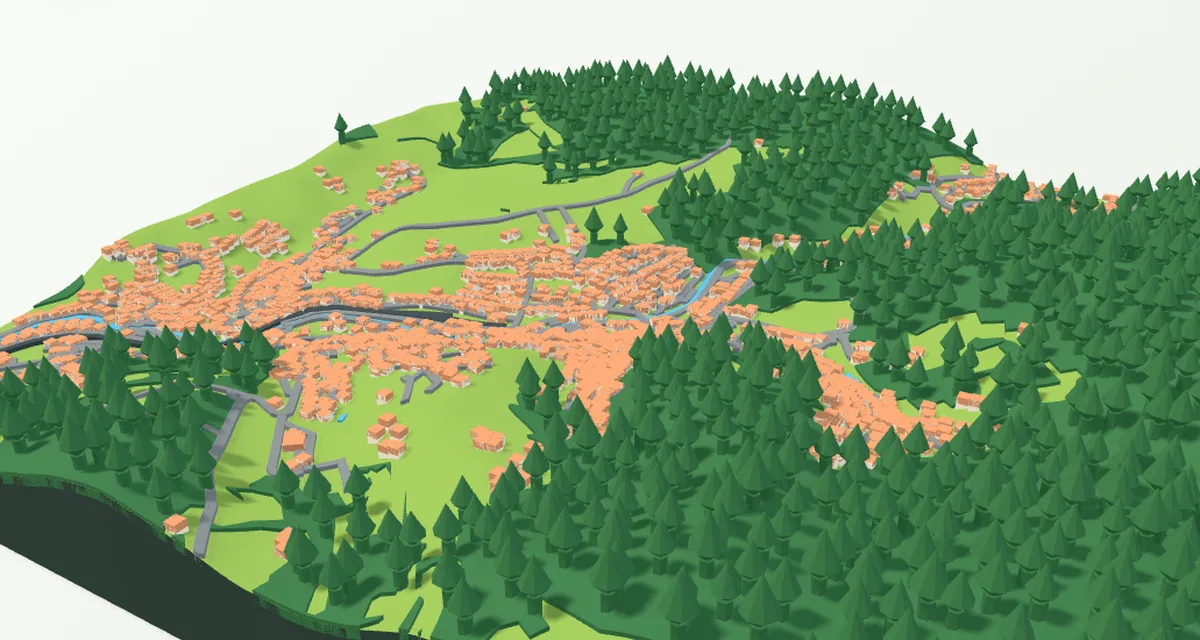
Create your own 3D map Turn your hometown, a mountain range or your neighbourhood into a model for 3D printing. Add your own GPX route, choose the shape, size, colours, frame and lettering, or assemble large wall art from smaller tiles. Buildings, bridges and trees use available map data, with more detailed sources in Czechia and Slovakia. Preview your model and download STL or colour 3MF for free to print on your own printer.
Choose a town, mountains or your neighbourhood. Add a GPX route, personalise the shape, colours, frame and lettering, or assemble large 3D wall art. Preview your model and download free STL or colour 3MF for your own printer.
Create your own 3D map
Free · No account needed · STL and colour 3MF
Enable JavaScript in your browser to configure your print.
Your print, your way
Choose how your model looks. We take care of the printing.
Size
10 cm 15 cm 20 cm 25 cm
Total height —
Base —
The 3D preview will determine the height.
Frame
Terrain shape
With hills
Flat terrain
Flat terrain: no hills; buildings stay raised.
Your inscription optional
Text on the model
Inscription position
No text Top left Top centre Top right Middle left Centre Middle right Bottom left Bottom centre Bottom right Front edge of the base More options: features, font and details →
See your print and price →
First, see an interactive 3D preview and a price including delivery.
No account needed · no order placed yet
← Back to your print options Your changes are kept.
1 Start by choosing a place Then make the model your own.
Find a place ↗ 1 Place 2 Features 3 Colors 4 Size 5 Frame and text 6 Print
01 START HERE
Find your place Search for a place or select it on the map.
Country Worldwide Afghanistan Åland Islands Albania Algeria American Samoa Andorra Angola Anguilla Antarctica Antigua & Barbuda Argentina Armenia Aruba Australia Austria Azerbaijan Bahamas Bahrain Bangladesh Barbados Belarus Belgium Belize Benin Bermuda Bhutan Bolivia Bosnia & Herzegovina Botswana Bouvet Island Brazil British Indian Ocean Territory British Virgin Islands Brunei Bulgaria Burkina Faso Burundi Cambodia Cameroon Canada Cape Verde Caribbean Netherlands Cayman Islands Central African Republic Chad Chile China Christmas Island Cocos (Keeling) Islands Colombia Comoros Congo - Brazzaville Congo - Kinshasa Cook Islands Costa Rica Côte d’Ivoire Croatia Cuba Curaçao Cyprus Czechia Denmark Djibouti Dominica Dominican Republic Ecuador Egypt El Salvador Equatorial Guinea Eritrea Estonia Eswatini Ethiopia Falkland Islands Faroe Islands Fiji Finland France French Guiana French Polynesia French Southern Territories Gabon Gambia Georgia Germany Ghana Gibraltar Greece Greenland Grenada Guadeloupe Guam Guatemala Guernsey Guinea Guinea-Bissau Guyana Haiti Heard & McDonald Islands Honduras Hong Kong SAR China Hungary Iceland India Indonesia Iran Iraq Ireland Isle of Man Israel Italy Jamaica Japan Jersey Jordan Kazakhstan Kenya Kiribati Kuwait Kyrgyzstan Laos Latvia Lebanon Lesotho Liberia Libya Liechtenstein Lithuania Luxembourg Macao SAR China Madagascar Malawi Malaysia Maldives Mali Malta Marshall Islands Martinique Mauritania Mauritius Mayotte Mexico Micronesia Moldova Monaco Mongolia Montenegro Montserrat Morocco Mozambique Myanmar (Burma) Namibia Nauru Nepal Netherlands New Caledonia New Zealand Nicaragua Niger Nigeria Niue Norfolk Island North Korea North Macedonia Northern Mariana Islands Norway Oman Pakistan Palau Palestinian Territories Panama Papua New Guinea Paraguay Peru Philippines Pitcairn Islands Poland Portugal Puerto Rico Qatar Réunion Romania Russia Rwanda Samoa San Marino São Tomé & Príncipe Saudi Arabia Senegal Serbia Seychelles Sierra Leone Singapore Sint Maarten Slovakia Slovenia Solomon Islands Somalia South Africa South Georgia & South Sandwich Islands South Korea South Sudan Spain Sri Lanka St. Barthélemy St. Helena St. Kitts & Nevis St. Lucia St. Martin St. Pierre & Miquelon St. Vincent & Grenadines Sudan Suriname Svalbard & Jan Mayen Sweden Switzerland Syria Taiwan Tajikistan Tanzania Thailand Timor-Leste Togo Tokelau Tonga Trinidad & Tobago Tunisia Türkiye Turkmenistan Turks & Caicos Islands Tuvalu U.S. Outlying Islands U.S. Virgin Islands Uganda Ukraine United Arab Emirates United Kingdom United States Uruguay Uzbekistan Vanuatu Vatican City Venezuela Vietnam Wallis & Futuna Western Sahara Yemen Zambia Zimbabwe
Map selection Vyberte místo Fit selection Enlarge map
Click to move the area. Zooming the map does not change the selected area.
0.2 km 200 km
Quick selection Custom value 200 m 500 m 1 km 2 km 3 km 4 km 5 km 8 km 10 km 16 km 25 km 50 km 100 km 200 km
Metres and kilometres set the ground area, not the viewing height. Set the print size in centimetres in the Size step.
U území nad 8,5 km se zobrazí reliéf a případná GPX trasa. Pro budovy, vodu a cesty zvolte menší výřez.
Vlastní trasa GPX kolo · běh · turistika Nahrajte svou trasu a uvidíte ji na mapě. Výřez se přizpůsobí celé trase.
Nahrát GPX
Zobrazit celou trasu Odebrat trasu
Barva trasy
Vyberte jeden z filamentů. Jeho odstín změníte v Barvách.
Šířka trasy ve výtisku0,6–5 mm. Pro silnější trysku se úzká trasa automaticky zesílí. GPX se čte v prohlížeči. Při uložení projektu nebo objednávce se uloží i trasa. Trasa je také součástí exportu 3MF; časy a původní výšky bodů se nepřebírají.
Your house on the map Highlight the selected house First search for and select an address with a house number or a specific building.
Select a house on the map
Change the house colour in Colours → 02
What goes on your model? Keep the recommended selection, or choose the features you want to see.
What to show on the model Clear model All features Terrain only
How features appear on the model Minor paths are switched off by default. When enabled, they are lower and narrower than roads. Shared walking and cycling paths are classified as cycleways; cycle lanes on a road remain part of that road. Tunnels are hidden. The elevation map cannot reconstruct underground caves, overhangs or openings in rock.
Terrain is always included. Only features available in the map data are shown. Tree count depends on scale and printable space. Mapped meadows, built-up ground, rock and sand form smooth coloured surfaces. Parks inside cities retain the terrain colour. With fewer colours, some parts share a filament; see the Colours tab.
In Czechia and Slovakia, individual trees also use their mapped OpenStreetMap positions. Available leaf information or a recognised genus determines a broadleaf or conifer shape; otherwise a generic rounded crown is used. Available height and crown width are adapted for printing. Illustrative trees fill forests according to their mapped type. Trunks are reinforced and embedded in the terrain, with crowns designed without horizontal overhangs. Trees that do not fit or clash with other features are omitted, never relocated. This is not a complete tree inventory or an exact botanical model.
03
Your place in color
Choose a style, then adjust individual shades if you wish.
Choose a colour style
Number of colours 1 colour 2 colours 3 colours 4 colours 5 colours 6 colours 7 colours 8 colours 9 colours 10 colours 11 colours
Assign colours to model parts Make the colours yours Enter HEX
Highlighted house House colour
Use a model colour The house has its own colour. It can also share a shade with roads or another model part. It keeps its own name in 3MF.
How colours are applied Built-up and other ground means the surface around buildings and terrain without another mapped classification. Meadows, forests, water, roads, rocks and sand have their own categories based on map data. These are not colours from aerial photography.
With filament assignments, set your actual filaments and choose one for each part. Four filaments can cover green meadows and trees, blue water, grey buildings and roads, and white ground and sides. Without assignments, the original automatic group merging applies.
Lighting and shadows in the 3D preview affect how a shade looks, but do not change its saved colour code.
3MF contains the final part colours. Assign them to filaments when importing into your slicer. STL contains only the shape.
05
Frame and text Add a personal touch. You can also leave the model without a frame or message.
Sides and rim No rim With rim
Rim width 2 mm 3 mm 4 mm 5 mm 8 mm 10 mm 15 mm 20 mm
3–100 mm from the bottom of the frame, including its backing if present. The top edge is level; the landscape can rise above it.
Tisk rámu Dohromady s mapou Zvlášť · vložit a přilepit
Clearance on each side 0.2 mm 0.3 mm 0.4 mm 0.5 mm
Change the base and frame colour in Colours → The frame has a level top edge. It is included in the print dimensions.
Settings have changed. Check your map selection in the Place step.
Check the map → Text on the model
Label text 0 / 40
Instant preview without map data Inscription detail
Flat preview of placement and size. In the final map, the inscription follows the terrain. Enter a place name or a dedication. The label is optional.
Remove label 04
Print size Choose the finished print size. For a larger picture, combine smaller tiles.
Pro skládaný obraz použijte poptávku obrazu na míru . Rozměry a provedení domluvíme společně.
Single model Tiled picture
Print footprint 150 × 150 mm
10 cm 15 cm 20 cm 25 cm Custom
Size (cm) Apply
5–40 cm. Overall size including the frame.
Print shape Square Rectangle Circle
Settings have changed. Check your map selection in the Place step.
Check the map →
Hills and base
Terrain shapeWith hills Flat terrain Base thickness2 mm 3 mm 5 mm 8 mm 10 mm
The flat option levels the landscape. Buildings and selected features remain above the surface.
The base is the bottom layer beneath the landscape.
Relief exaggeration 1.5× True proportions Stronger hills
Total print height After the model is created Calculated from the landscape and the chosen size.
06
Ready for printing For a standard 0.4 mm nozzle, you can keep the default settings.
Nozzle diameter 0.2 mm 0.4 mm 0.6 mm 0.8 mm
Print layer height
Use the same layer height in your slicer. Small buildings and the colour skin are at least 3 layers thick; very fine details are enlarged or omitted according to your choice.
Small and slender features Adapt for printing Leave out Bridges and print supports Open bridge · add supports in your slicer Add permanent piers Preparing your model for printing Permanent piers remain part of the print. Temporary supports are generated by your slicer and removed after printing. Suspension bridges need support for the deck and fine details.
Narrow buildings and towers adapt to the nozzle and print size.
Forests use a coloured surface; small areas can also have trees. Roofs in covered Czech selections follow the ČÚZK surface; elsewhere they use available OSM attributes. Without usable data they remain simplified. Roof colour can be set separately. Small details are adapted for printing.
Colour layer and material use Coloured layer thickness 0.6 mm 0.8 mm 1 mm 1.5 mm 2 mm 3 mm
Only the top skin is printed in colour; the model body uses one colour. The skin allows at least 3 print layers. Choose a thicker skin for less opaque filament.
← Back 1 of 6 Continue →
Large models need more memory On a phone or a device with less memory, start with an area of 500 m to 1 km. The browser may interrupt complex models. If this keeps happening, use a computer.
Memory-saving mode reduces terrain detail in both the preview and the print file. For the most detailed terrain, create the model on a computer.
Reduce area to 1 km Create a free 3D model No account needed · Free STL and 3MF
♡ Save to favourites Registered users only
Settings have changed This preview shows the previous settings. Generate the model again to apply your changes.
Generate updated model Loading the real landscape… Elevation and map data are being prepared.
S↑
Drag to rotate · Scroll to zoom
Model and printing details
Elevation source —
Elevation range —
Terrain shape —
Map data —
Your place is ready for a new dimension. Download your model and prepare it in your slicer.
Download model Have it printed by us
WHAT’S NEW More reliable startup and clearer area limits See all updates →
YOUR PLACES AND INSPIRATION
Favourite places and saved maps Your private maps in one place, alongside public inspiration from others. Reopen your saved settings, adjust them and prepare your model for printing.
No maps from users yet. Save your own map in your account and offer it to Favourites.
Want to share a map with others? Choose “Offer for public sharing” in My account. It will only become public after approval.
MY ACCOUNT · ADMIN
Production and management Your maps and colours, customer orders and website settings in one place.